


The worldwide internet can feel like a crowded city street, full of amazing destinations, but also shady characters watching your every move. A VPN might be the right answer if you’ve ever wondered how to stay private, safe, and in control online.
But what exactly is a VPN, and do you really need one?
This Mysterium VPN guide is designed for complete beginners; no tech jargon, no confusion. Whether you're just curious or ready to take control of your online privacy, this blog post will walk you through everything you need to know to stay safe online.
By the end, you’ll understand what a VPN is, how it works, and how it can help you browse more securely, privately, and confidently. Let’s get started, shall we?
What Does VPN Stand For?
Let’s get down to business. A VPN stands for “virtual private network”. That might sound technical, but it’s really about one simple idea: privacy online. Let’s break it down:
- “Virtual” means it works through software, not wires; it's digital.
- “Private” means only you can see what you're doing.
- “Network” is the connection between your device and the internet.
A better way to think about this is to imagine that you’re driving in a taxi through a busy city.
You are the passenger, trying to get to a destination (like a website). Your data is everything you're carrying with you, such as photos, messages, passwords, and online browsing activity.
The VPN is your private taxi with tinted windows; it shields you from the people outside (like hackers, your internet provider, or advertisers) who might be watching the road.
Without a VPN, it’s like you’re riding a bike down that same street with a clear backpack; everyone can see what you’re carrying and where you’re going. But with a VPN (your tinted window taxi), no one can see inside, and your route is hidden.
What Is a VPN App?
A VPN app is a simple piece of software, like any other app, that you install on your device, like your phone, computer, or tablet, to help you connect to a VPN service with just a few clicks.
Think of it like the remote control for your secure connection. You don’t need to mess with complicated settings or tech wizardry. Just open the app, tap “Connect,” and you’re instantly protected.
- On your smartphone, the app runs quietly in the background, keeping your data safe whether you're using mobile data or publicly available Wi-Fi networks.
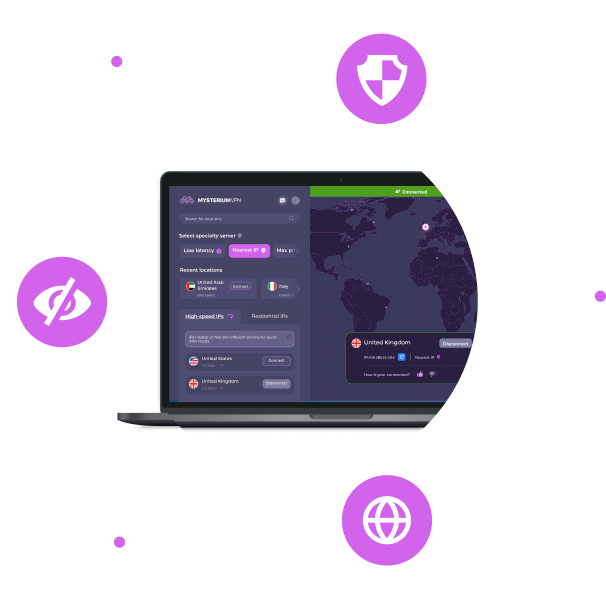
- On your laptop or desktop, it’s often just a small icon near the clock; you click to open the app, choose a server, connect, and you’re good to go.
Most VPN apps, including the Mysterium VPN app, also let you:
- To choose the location of your virtual server (like picking where your “secure taxi” starts).
- To enable extra features like a kill switch or auto-connect when joining public Wi-Fi.
- To view your connection details and check if your IP address has been successfully hidden,
You don’t need to be tech-savvy to use a VPN app. If you can use Netflix or send an email, you can use a VPN app with no problems.
How Does a VPN Work?
A VPN works by creating a secure, encrypted tunnel between your device and the internet. This tunnel keeps your online activity hidden from prying eyes, whether it’s hackers on public Wi-Fi, your internet provider, or advertisers trying to track you.
When you turn on your VPN, your device connects to a VPN server somewhere in the world. That server becomes the middleman between you and the internet.
So, instead of going directly to a website or app, all your traffic first travels through this encrypted tunnel to the VPN server, which then sends the request on your behalf.
Because of this, websites don’t see your real IP address or location; they only see the IP address of the VPN server you’re connected to. At the same time, encryption makes your data unreadable to anyone who might try to intercept it.
So even though you're still browsing the web, it's as if you're doing it with an invisibility cloak. Your personal information stays private, and your online activity becomes much harder to track.
What Are the Key VPN Features?
If you're new to VPNs, you might wonder what exactly they can do for you. While the core job of a VPN is to protect your privacy, many modern VPNs offer extra features designed to keep you even safer, more flexible, and in control of your online experience.
Here are some of the key features to look for:
Encryption
This is the heart of any VPN. Encryption scrambles your internet traffic so no one, not hackers, internet providers, or nosy network admins, can read what you’re doing online.
IP Address Masking
A VPN hides your real IP address and replaces it with one from the VPN server. This makes it harder for websites and services to track your identity or location.
Server Switching
Most VPNs let you choose servers in different countries. This can help you browse more freely or avoid region-based restrictions while staying secure.
Kill Switch
If your VPN connection drops unexpectedly, a kill switch blocks all internet traffic until it reconnects. This prevents accidental data leaks.
No-Logs Policy
A strong privacy-focused VPN won’t track or store your browsing activity. Look for a provider with a verified no-logs policy to be sure your data isn’t saved or shared.
Split Tunneling
This feature lets you choose which apps or websites go through the VPN and which don’t. For example, you can use the VPN for your browser while keeping local apps on your regular connection.
Auto-Connect on Wi-Fi
Many VPN apps offer automatic protection whenever you join an unsecured Wi-Fi network, like in airports or coffee shops.
These features may vary depending on the provider, but even basic VPNs typically include encryption, IP masking, and server switching. As you learn more, you’ll be able to decide which features matter most for your needs, whether it’s privacy, speed, or simplicity.
Why Do I Need a VPN?
The internet is convenient, but it's not entirely private. Every time you go online, your activity can be seen, stored, or tracked by multiple parties: your internet service provider (ISP), advertisers, websites, and even cybercriminals.
A VPN gives you a way to regain control over your digital footprint by creating a secure, private connection. Here are all the reasons why you should get a VPN.
Stay Safe on Public Wi-Fi
Public Wi-Fi networks, like those in airports, hotels, or coffee shops, are often unsecured. That means anyone on the same network could potentially intercept your traffic using basic tools.
If you check your email, log into your bank, or shop online without protection, you're putting your personal data at risk. A VPN encrypts your connection, making it unreadable to others on the network, even if they're trying to snoop.
Prevent ISP Tracking and Logging
Your ISP can track every website you visit, every file you download, and even how long you spend online. In some countries, they're allowed (or even required) to store that data for months or years. In others, they may sell anonymized browsing data to marketers.
When you use a VPN, your ISP only sees that you're connected to a VPN server; it can’t see the websites you’re visiting or what you're doing.
Protect Personal and Financial Data
Whether you're filing taxes, checking your bank account, or managing your crypto wallet, a VPN adds an essential layer of protection.
Malware or malicious apps could try to intercept or leak your information even if you're on a private home network. A VPN encrypts your entire internet connection, reducing the risk of that data falling into the wrong hands.
Limit Online Tracking and Ads
Many websites track your IP address, browser type, and activity to build a profile for targeted advertising. Over time, this creates a detailed picture of your habits, preferences, and behavior.
By masking your IP address and routing your traffic through a VPN server, you're much harder to track. Some VPNs even include features that block ads and known tracking domains.
Safer Access While Traveling
When you travel, you may find that familiar services, like banking apps or video platforms, don’t work the same way or aren’t available at all. Some governments also restrict access to popular websites.
A VPN lets you connect through a server in your home country, helping you maintain access to the services you use daily, in a more private and secure manner.
Protect Voice and Video Calls
Video and voice calling apps (like Zoom, WhatsApp, or Skype) can also be vulnerable to surveillance or interference, especially on unsecured networks.
A VPN helps protect these communications from eavesdropping by encrypting the connection between your device and the service you're using.
Maintain Privacy on Shared or Work Devices
If you're using a shared computer or a device issued by your employer, others may be able to view your browsing history or monitor your activity. A VPN helps protect your privacy by preventing network-level tracking; no one on the same connection can see what you’re doing.
Whether you're a casual user, a frequent traveler, or someone handling sensitive information, using a VPN is one of the simplest and most effective ways to stay secure.
How Do You Use a VPN?
Using a VPN might sound technical, but it’s surprisingly simple, especially with modern apps designed for beginners. You don’t need to configure complicated settings or be an IT expert to get started. Here’s how you can set up Mysterium VPN on your devices.
- Pick a subscription plan from our website that fits your needs and create an account.
- Download and install the Mysterium VPN app on your phone or computer.
- Once installed, open up the app and log in to your account.
- Choose a server location and click “Connect”.
- Once connected, start browsing as normal.
How to Set Up a VPN?
Installing the VPN provider's app is the easiest and most popular method. Head to their website or search for the app in your device’s app store, whether it’s the App Store on iPhone, Google Play on Android, or the official site for desktop versions.
Once installed, open the app, log in with your credentials, and tap “Connect.” Your internet traffic will then be encrypted and routed through a secure VPN server.
Most operating systems also allow manual VPN setup for those who prefer not to use a dedicated app, or in situations where it’s not an option.
You’ll need to go into your network settings, add a new VPN connection, and input the server address and login details provided by your VPN provider. This method can be useful in workplaces or shared systems, though it may lack some advanced features found in dedicated apps.
Another option is to set up a VPN on your router. This covers every device connected to your home Wi-Fi network, including smart TVs, gaming consoles, and IoT devices.
Some VPN providers also offer browser extensions. These are lightweight tools that only protect your browser traffic, not the rest of your apps, but they’re fast, convenient, and great for occasional use when you just want to browse privately.
Depending on which method you choose, most VPN setups take less than five minutes to complete. The app route is ideal for beginners, while router or manual configuration gives more control to advanced users.
Cool Things to Do With a VPN
A VPN can do more than just protect your data. Here are some of the most common and useful ways people use a VPN in everyday life.
Stay Safe on Public Wi-Fi
Public networks in airports, cafés, and hotels are convenient, but often unencrypted and vulnerable to attackers. A VPN encrypts your connection, making it much harder for anyone to snoop on your activity or steal your login details.
Stream While Traveling
Some people use VPNs while abroad to continue watching content from their home country’s streaming platforms. It’s important to respect each service’s terms of use, but a VPN can help travelers avoid losing access to familiar shows or live sports.
Avoid Throttling and Improve Gaming
Internet service providers sometimes slow down traffic for certain activities like gaming or streaming. A VPN can mask what you're doing online, helping you avoid speed throttling. Some gamers also use VPNs to connect to different regions or reduce lag, depending on the server.
Browse Privately
Websites, advertisers, and even apps track what you do online to serve you ads or build data profiles. A VPN hides your IP address and encrypts your traffic, making it harder to track your activity across sites.
Access Uncensored News or Information
In regions with heavy internet censorship, VPNs are a lifeline for accessing blocked websites, independent news sources, or social media. They give people a safer way to browse and communicate freely.
Work Remotely with More Security
If you’re a freelancer or working remotely, a VPN helps you securely connect to your company’s servers or cloud tools, especially when using public or shared networks. It adds an extra layer of encryption to protect sensitive work data.
Free VPN vs. Paid VPN: What’s the Difference?
- Limited data and speed: Free VPNs often restrict how much data you can use each month and slow down your connection, causing interruptions or buffering during streaming.
- Fewer server options: Paid VPNs offer many servers worldwide, while free VPNs usually have only a handful. This can lead to overcrowded servers and slower, less reliable connections.
- Weaker privacy and security: Some free VPNs track your activity, show ads, or sell your data to third parties. Paid VPNs generally have strict no-logs policies and stronger encryption to protect your privacy.
- Lack of advanced features: Features like kill switches (which block internet if the VPN drops), split tunneling, and 24/7 support are usually missing from free VPNs but are included in paid plans.
- Better reliability and support: Paid VPNs offer ongoing updates and customer support to fix issues and improve security. Free VPNs often don’t provide reliable support or regular updates.
VPN vs. Proxy vs. DNS vs. Firewall vs Tor: What’s the Difference?
When choosing how to protect your online activity or access content, it helps to understand the differences between popular tools. Here’s a simple breakdown:
| VPN | Proxy | Smart DNS | Firewall | Tor | |
| Purpose | Secure and private internet access by encrypting all traffic. | Reroutes traffic for specific apps, usually web browsers. | Changes your DNS to access geo-restricted content. | Blocks unauthorized access to/from networks. | Anonymizes internet traffic by routing it through volunteer nodes. |
| Encryption | Yes, strong encryption for all traffic. | Usually, no encryption. | No encryption. | No encryption. | Yes, encrypts traffic multiple times. |
| Speed | It can slow down the internet due to encryption and routing. | Usually faster than VPN, less secure. | Fast, since it doesn’t encrypt. | No speed impact. | Slower due to multiple relay hops. |
| IP masking | Yes, hides your real IP address. | Yes, but less reliable. | Yes, only for DNS queries. | No. | Yes, changes your IP frequently. |
| Traffic coverage | All internet traffic on a device or network. | Usually, browser or specific apps only. | DNS requests only. | Controls traffic based on rules. | All traffic is routed through the Tor network. |
| Privacy level | High, with encryption and no-logs policies. | Low to medium, no encryption. | Low. | Depends on the rules set; no encryption. | Very high, focused on anonymity. |
| Common use cases | Privacy, security, safe public Wi-Fi, streaming. | Unblocking websites, IP masking. | Streaming geo-blocked content. | Network security, blocking threats. | Anonymity, circumventing censorship. |
| Installation | App or manual setup on devices or routers. | Usually, the browser setup. | Usually, the device or router settings. | Network hardware or software. | Requires Tor browser or client. |
| Best for | Secure, private internet access. | Basic IP masking, lightweight tasks. | Streaming geo-blocked content. | Network protection. | Strong anonymity and privacy needs. |
Are VPNs Legal?
Yes, VPNs are legal in most countries around the world. Individuals, businesses, and governments commonly use them to protect online privacy and secure internet connections.
However, the legality of VPN use can vary depending on local laws and regulations. Some countries with strict internet censorship or surveillance policies may restrict or ban VPN use entirely. Examples include China, Russia, and certain Middle Eastern countries where accessing censored content or hiding internet activity is tightly controlled.
Even in places where VPNs are legal, using them to perform illegal activities, like hacking, downloading pirated content, or committing fraud, is against the law. If you’re unsure about VPN laws in your country, it’s a good idea to research local regulations before using one.
Can VPNs Be Tracked or Blocked?
Some websites and networks can detect and block VPN use, especially streaming services like Netflix, or in countries with strict internet controls. However, VPN providers consistently improve and update their tech to avoid this, but it’s not foolproof.
A VPN hides your real IP, making tracking harder, but those services still know you if you log into accounts. Some VPNs offer “stealth” modes to hide VPN traffic from blocks or monitoring. VPNs improve privacy but can’t guarantee complete invisibility.
Tips for Choosing the Right VPN
Here’s everything you need to consider when choosing the right VPN!
- Prioritize strong privacy and security: Look for VPNs with strong encryption, a strict no-logs policy, and features like a kill switch to protect your data if the connection drops.
- Consider speed and server locations: Choose a VPN with many servers worldwide to ensure fast, stable connections and the ability to connect near your location or where you need.
- Check device compatibility: Ensure the VPN supports all your devices so you can stay protected everywhere.
- Evaluate ease of use: Pick a VPN with a simple app interface that’s easy to set up and use, especially if you’re new to VPNs.
- Look for reliable customer support: Good customer service can help solve problems quickly, so choose providers that offer 24/7 support through chat or email.
- Compare plans: Free VPNs have limits and risks. Paid VPNs often offer monthly or yearly plans with more features and better performance. Consider your budget and needs.
Alternatively, you don’t have to think about anything – with Mysterium VPN, we’ve got you covered on all fronts. Enjoy online safety with peace of mind – now with 68% off!


Protect Yourself Online. Try Mysterium VPN Risk-Free!
Get Mysterium VPN
asd

Gintarė is a cybersecurity writer at Mysterium VPN, where she explores online privacy, VPN technology, and the latest digital threats in editorial pieces. With hands-on experience researching and writing about data protection and digital freedom, Gintarė makes complex security topics accessible and actionable.